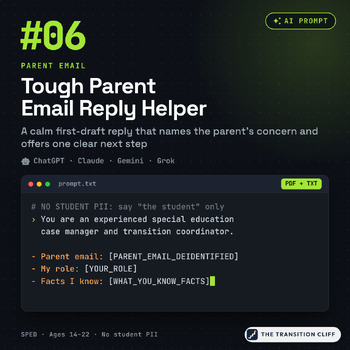
Tough Parent Email Reply Helper Prompt
$3.00
Digital download, instant delivery, no shipping. Refund policy
Buy on Payhip (secure checkout), $3.00
Instant digital download (PDF or the file type listed). You get the file right after checkout and a download link by email. Delivery details.
Refund policy: digital downloads are final sale, but a broken or wrong file will be fixed or refunded.
Some parent emails hit hard. You want to answer fast, and that is exactly when a reply can go sideways. I built this prompt for my own inbox. You paste in a de identified copy of the parent's email, add the facts you know and the next step you can offer, and the AI tool your district allows gives you a calm first draft. It thanks the parent, names the concern, sticks to facts, and moves the conversation to a call or meeting.
What the prompt gives you back (6 labeled sections):
• A PII check, so the AI flags anything identifying before it writes
• What the parent is asking and feeling, for your eyes only (not sent)
• A calm subject line with no student name
• The reply email: acknowledgement, facts only, no blame, and one clear next step
• A "before you hit send" checklist for that email
• TEAM INPUT NEEDED flags for any line that needs a fact check, a teammate, or an administrator
What's inside:
• The copy ready prompt, as a PDF page and a plain text file that copies cleanly
• How to use it with the chat assistant your district allows
• A NO STUDENT PII guide with quick de identify swaps for parent emails
• A Parent Email Reply Worksheet that matches the prompt's 5 brackets
• A Weak vs. Strong input guide
• 2 real sample outputs (fictional emails, unedited)
• A review checklist to use before you hit send
Great for:
• SPED teachers and case managers who get the hard emails
• Replies about missed accommodations, behavior calls, transition worries, and bus or communication delays
• Anyone who wants to answer quickly without arguing in writing or promising what only the IEP team can decide
Please note: never enter student names or identifying information, and remove names and signatures from the parent's email before you paste it. Follow your district's AI, data privacy, and parent communication policies. Outputs are drafts for the IEP team. This is not legal advice. The reply draft is NOT prior written notice and is NOT a decision on services, placement, or the IEP. Loop in your case manager or an administrator when an email involves services, discipline, safety, or legal concerns.
Pair it with: my IEP Meeting Recap for Families Prompt, IEP at a Glance for Gen Ed Teachers Prompt, IEP Progress Report Narrative Writer Prompt, IEP Transition Goal Writer Prompt, and Summary of Performance Drafter Prompt.
New to transition?
Created and classroom tested by a special education teacher, with AI drafting help.